
Most dental marketing agencies set up every Google Business Profile the same way.
Same description templates. Same service blurbs. Same booking integrations.
Same advice.
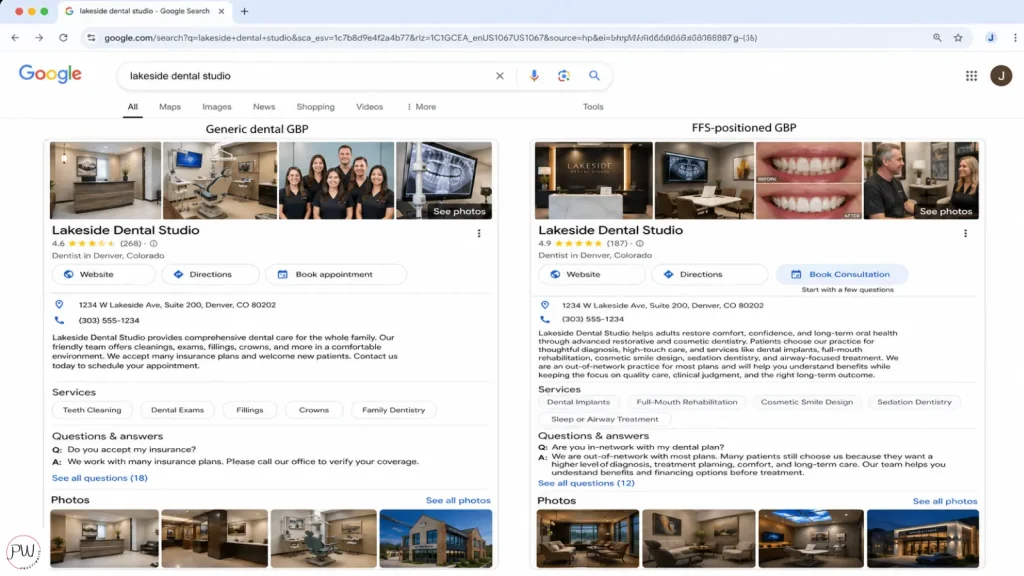
That’s exactly why fee-for-service practices that follow generic GBP advice keep ending up with the same problem: a profile full of patients asking “do you take my insurance?
A fee-for-service Google Business Profile for dental practices has a different job than a profile for a PPO practice.
A PPO practice runs on volume, so its GBP is built to attract anyone with a covered cleaning.
A fee-for-service practice runs on quality, so its profile has to do the opposite.
It has to filter. It has to position. It has to attract patients who are already comfortable paying out-of-pocket for excellent dentistry, and gently screen out the ones who aren’t.
That single shift changes everything downstream: how you write your description, which services you list and in what order, which booking platform you use, how you seed your Q&A, even which photos you upload.
Get it right and your phone rings differently.
Get it wrong and you’ll keep paying for marketing that brings you the wrong patient.
If you’ve been wondering why your GBP keeps generating insurance calls instead of high-value cases, this is the rebuild.
Why Is Fee-For-Service Google Business Profile Optimization Different?
Fee-for-service Google Business Profile optimization for dental practices is the deliberate setup of every profile field, from category to attributes to Q&A, to attract patients who are willing to pay out-of-pocket for quality care and to screen out patients who shop primarily on insurance acceptance. It’s positioning, packaged as local SEO.
Here’s what changes when you optimize an FFS profile correctly:
- The description leads with outcomes and expertise, not “comprehensive care for the whole family.”
- The services list highlights production-driving procedures (implants, full-mouth rehab, cosmetic, sedation, sleep) instead of leading with cleanings.
- The booking link goes to a scheduler that asks the right pre-qualifying questions.
- The Q&A pre-answers the “are you in-network with my plan?” objection in a way that wins patients who value the practice over the network.
- The photos sell the experience your patients are paying premium fees for, not just a clean operatory.
PPO marketing is a numbers game. FFS marketing is a positioning game. Your GBP is the most-seen sales asset you own, and most FFS practices have it set up like a PPO practice and then wonder why their phone rings with the wrong patients.
Granted, none of this means you’ll never get an insurance question. You will. But the patients who book with an FFS-positioned profile arrive expecting a different kind of practice, and that changes everything about case acceptance.
How Do You Claim And Verify Your Dental Google Business Profile?
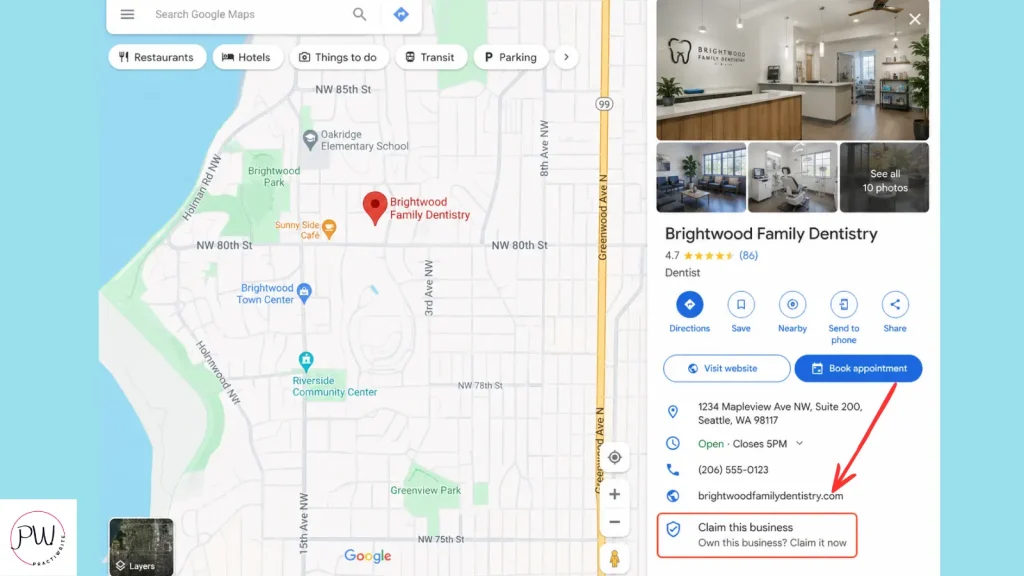
To claim your dental Google Business Profile, search your practice name on Google Maps, click “Claim this business” if it appears, then verify ownership through the method Google offers (usually video verification or postcard PIN). Until verification is complete, Google will not fully rank or display your profile updates.
If your practice doesn’t show up at all, head to Google Business Profile and add the business from scratch.
A few things have changed in 2026 that matter here. Single-location practices now manage almost everything directly inside Google Search and Maps rather than through a separate dashboard.
Multi-location practices still get the GBP Manager dashboard. Video verification has replaced postcard verification for most new listings, which means you’ll record a short walk-through showing your sign, your front desk, and proof you have access to the space.
I recommend doing video verification when offered. It’s faster than waiting on postcards (which can take 7 to 14 days), and it tends to clear faster too.
Stop optimizing until you’re verified. Google won’t show your updates publicly until verification clears. Don’t waste hours rewriting your description on a profile that’s not live.
What Are NAP, Categories, And Hours, And Why Do They Matter For Fee-For-Service Practices?
NAP stands for Name, Address, and Phone number. These three fields, combined with your primary category and your operating hours, are the foundational relevance signals Google uses to decide which searches your practice is eligible for. Inconsistent NAP across the web is one of the fastest ways to tank a local ranking.
Your name, address, and phone number must be formatted identically across your GBP, your website, your Facebook page, your Yelp listing, your Healthgrades profile, and every directory you appear in. “Suite” vs. “Ste.” matters. “Ave” vs. “Avenue” matters. Phone number formatting matters.
Tools that check this for you:
- Moz Local
- BrightLocal Citation Tracker
- Whitespark Local Citation Finder
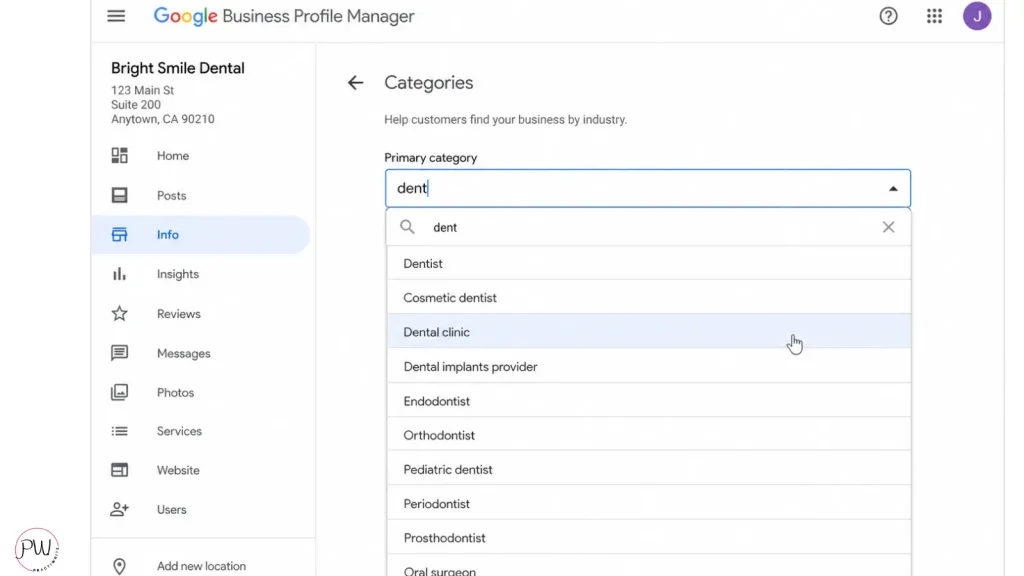
Choose a primary category that matches FFS positioning
Most practices default to “Dental Clinic” as their primary category, and for many that’s right. But if your fee-for-service positioning is built around a specific high-value service line, your primary category should match that.
If your practice is heavily cosmetic, “Cosmetic Dentist” is the better primary category. If you’re sedation- or sleep-focused, “Dental Implant Periodontist” or specialty categories might serve you better. The primary category is the single most influential field on your profile for what searches you’re eligible to rank for, so don’t pick it on autopilot.
Add as many relevant secondary categories as your practice legitimately supports. Don’t stuff. Google will suspend you for over-categorization.
Hours: keep them honest, including holidays
Set your regular hours, your holiday hours, and any closures. Practices showing as “Closed” when they’re actually open lose calls. Practices showing as “Open” when they’re closed lose trust. Update immediately when anything changes.
How Do You Write A Google Business Profile Description That Screens Out PPO Shoppers?
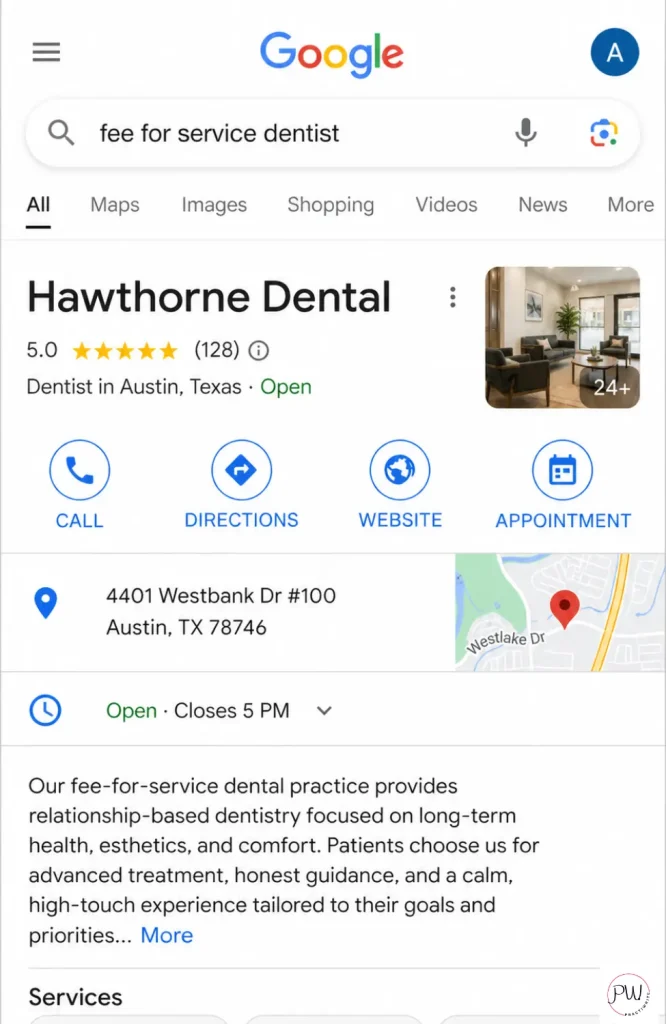
A fee-for-service Google Business Profile description should lead with the outcomes patients pay premium fees for (expertise, time, technology, comprehensive care) and signal cash-pay positioning without using the words “out-of-network.” It uses 750 characters total, with the most important positioning loaded into the first 250 characters that show in the search preview.
Here’s the difference between a generic description and one written for FFS positioning.
Weak description (PPO-coded, attracts insurance shoppers)
Looking for a top-rated dentist in Scottsdale who actually calls you back? At Desert Ridge Dental, we specialize in cosmetic and family dentistry with zero corporate nonsense. From same-day crowns to smile makeovers, we’ve got your whole crew covered. Book today and see why we’re Scottsdale’s go-to dental team.
This was the “strong” example in our old GBP guide. It’s not. “Whole crew covered” is volume-practice language. “Family dentistry” is what every PPO patient searches for. “Go-to dental team” doesn’t differentiate from anyone.
Strong FFS description
Scottsdale’s complex-case dentist for patients who want their teeth treated like an investment, not a transaction. At Desert Ridge Dental, Dr. [Last Name] practices comprehensive, single-clinician dentistry: implants, full-mouth rehab, advanced cosmetic, and complete care planning that protects your dentistry for decades. We schedule longer appointments, plan complete treatment in writing, and handle insurance paperwork as a courtesy without letting plans dictate clinical recommendations. Now accepting new patients.
Why this works:
- Positioning loaded into the first sentence so it shows in the search preview
- “Complex-case dentist” signals expertise, screens out routine shoppers
- “Treated like an investment” primes higher-fee mindset
- “Insurance as a courtesy” handles the in-network question without confrontation
- “Longer appointments” and “complete treatment in writing” signal premium experience
- “Single-clinician” differentiates from corporate and DSO models
You’ll lose some “do you take Delta?” calls with this description. That’s the point. The patients you want are reading the words “comprehensive,” “investment,” and “decades” and self-qualifying.
Pro tips for writing yours
Use city plus high-intent specialty keywords (e.g., “Scottsdale cosmetic dentist,” “Bay Area dental implants”). Mention signature services, especially the high-value ones. Infuse your actual brand voice. End with a clear, soft CTA (“now accepting new patients” tends to work better than “book today” for FFS).
And here’s a small but important thing: reject Google’s AI-suggested description if it offers one. Google’s AI is now generating description drafts inside the GBP dashboard, and they’re trained on generic dental practice copy. They will undo your positioning in a single click.
Which Services Should Fee-For-Service Dental Practices List On Google Business Profile?
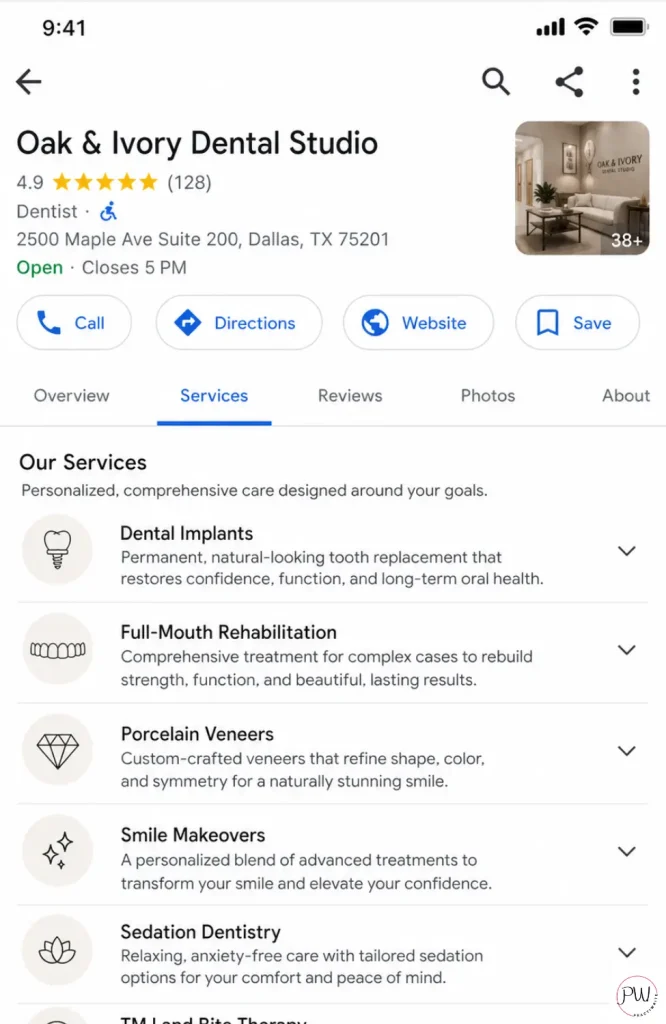
Fee-for-service practices should list every service they offer on their Google Business Profile, but they should sequence the list with high-value, production-driving procedures first (implants, full-mouth rehab, advanced cosmetic, sedation, sleep). Then write descriptions that emphasize expertise, technology, and patient experience rather than convenience and price.
The services tab is one of the most underused fields on a dental GBP. Most practices either skip it or copy-paste five generic entries. That’s a wasted opportunity.
What to do
List specifically. Don’t put “General Dentistry” as a single line item. Break it out into the specific procedures you want to be found for. Same for cosmetic and restorative.
Write a short description under each service. Two to three sentences. Use natural keywords. Don’t write a textbook.
FFS-positioned service examples
Service: All-on-Four Dental Implants
Description: Full-arch implant restoration completed in our [City] office, often in a single day. Dr. [Last Name] has placed [number] All-on-Four cases since [year] and works with the same in-house lab partner from planning through final delivery.
Service: Comprehensive Cosmetic Smile Design
Description: Personalized smile design starts with a full diagnostic workup, photographs, models, and a wax-up before any teeth are touched. We plan the result first, then execute. Most cases include 8 to 10 veneers and span 4 to 6 weeks.
Service: IV Sedation Dentistry
Description: In-office IV sedation administered by our board-certified dental anesthesiologist for patients with significant anxiety, severe gag reflex, or complex treatment needs. We handle complete dentistry in fewer visits.
Notice what’s happening here. Each description signals expertise, time, technology, and the kind of patient who’d value all three. Compare that to “Cleanings, fillings, and exams in a friendly environment,” which is the standard PPO entry, and you can see how the same field becomes a positioning tool.
Add Products too (most practices skip this)
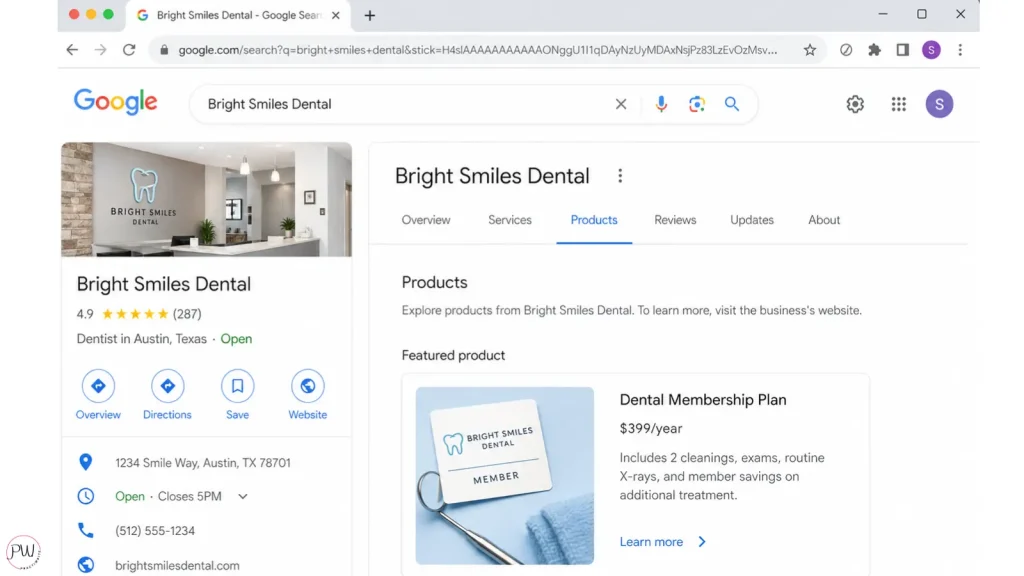
Google Business Profile has a Products section that most dental practices ignore. It’s gold for FFS practices because it’s where your in-house membership plan belongs.
Add your membership plan as a Product, with tiers, monthly cost, what’s included, and a “Learn More” CTA pointing to your membership page. This is one of the cleanest ways to signal cash-pay positioning on Google itself.
What Photos And Videos Should A Fee-For-Service Dental Practice Upload?
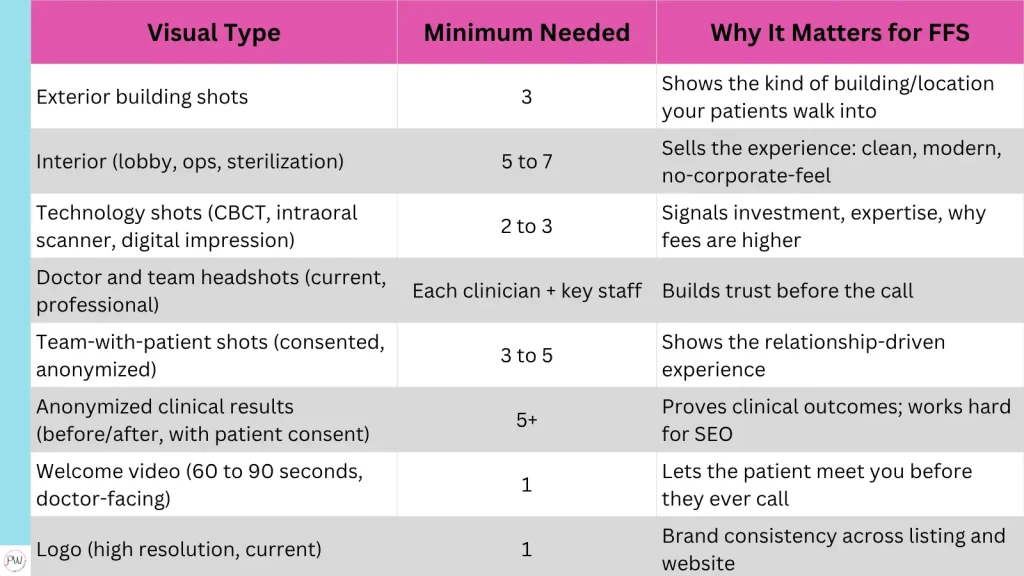
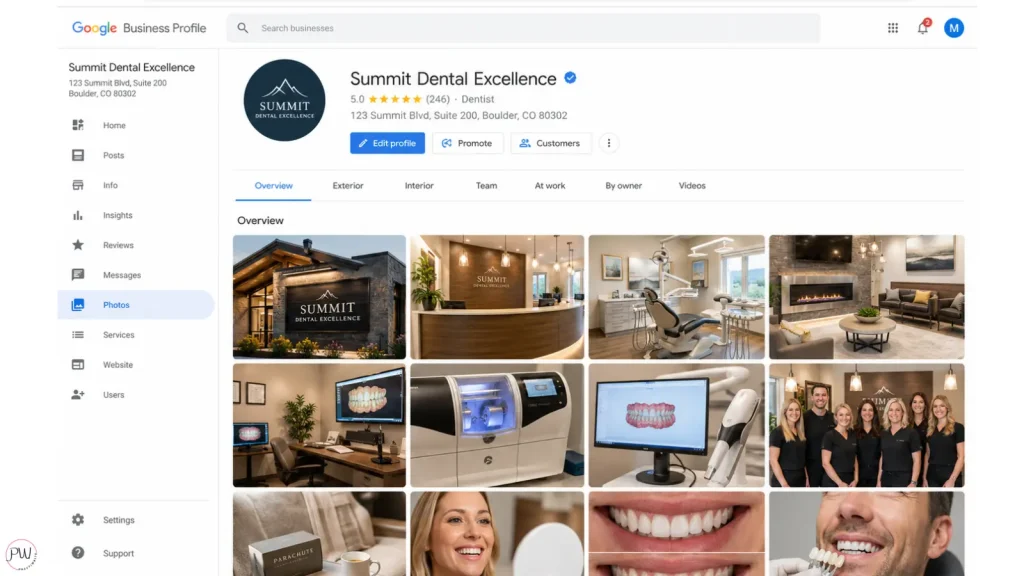
Photos and videos on a fee-for-service Google Business Profile should sell the experience patients are paying premium fees for: the time, the technology, the team, and the clinical outcomes. The visual lineup should feel less like a dental directory listing and more like the lobby of a high-end practice.
People don’t trust what they can’t see. According to Google’s own platform research, businesses with rich photo and video content consistently see higher click-through and direction-request rates than those with sparse profiles. For a fee-for-service practice, the photos do double duty: they prove you’re real, and they signal you’re worth what you charge.
The FFS Visual Lineup
What to avoid
- Stock photos. Patients can spot them in a second.
- Yellow-tinted, low-light interior shots.
- Staff selfies in scrubs.
- Anything outdated (the magazine rack with magazines from 2019, the carpet pattern from 1998).
- Generic Google Street View as your only exterior shot.
I’d recommend hiring a local commercial photographer for a half-day shoot once a year. Headshots, interior and exterior, technology shots, a few candid team shots, and a 60-second welcome video. For most practices, that’s a $400 to $800 investment that pays for itself with the first new comprehensive case it brings in.
How Do Reviews Work On Google Business Profile In 2026?
Reviews on Google Business Profile are now one of the strongest ranking signals for both the local pack and Google’s AI Overviews, and consumer expectations for star ratings have risen sharply year-over-year. According to BrightLocal’s Local Consumer Review Survey 2026, 31% of consumers will only use a business with 4.5 stars or more, up from 17% in 2025. Sixty-eight percent now require four or more stars, up from 55% the year before.
The bar for what qualifies as “acceptable” jumped in twelve months.
For fee-for-service practices, reviews aren’t just social proof. They’re SEO fuel and pre-qualification.
How to get more reviews (consistently)
Ask in person. Every happy patient is a five-star waiting to happen. Have your front desk make the ask at checkout, and follow up with a text or email about an hour after the appointment. Make the link one click.
I don’t recommend fully automated review platforms like Birdeye for FFS practices. They feel impersonal, and the personal touch is the entire point of an FFS practice. Use a simple text from your practice management software with the direct review link, sent by a real person, an hour after the appointment.
Respond to every review (positive and negative)
This is non-negotiable. 88% of consumers said they’d use a business that replies to all of its reviews, compared to just 47% who’d use a business that doesn’t respond at all.
A few real templates I’d use:
Positive review:
“Thanks, [Name]. Glad we could finish the implant case in time for the wedding. See you at your six-month check.”
Negative review (genuine issue):
“[Name], I’m sorry your visit didn’t meet our standards. I’d like to talk through what happened. Please call me directly at [phone]. Dr. [Last Name].”
Negative review (insurance complaint, FFS practice):
“[Name], thanks for the feedback. Our practice operates on a fee-for-service model, which we explain in advance and is described on our website. Insurance isn’t the focus of how we plan treatment, and that’s not the right fit for every patient. We wish you well.”
That last one is the FFS-specific play. You don’t apologize for being out-of-network. You restate the positioning, kindly.
Use reviews as keyword fuel
Google scans your reviews for keywords. When patients write “best implant dentist in [City]” or “great experience with my full-mouth rehab,” it helps you rank for those terms. To encourage this without sounding weird, train your team to say:
“If you’re happy with how things went, feel free to mention what you came in for in your review, whether that was your veneers, your implant, or just an exam.”
That single sentence creates dozens of keyword-rich reviews over a year.
What about photos in reviews?
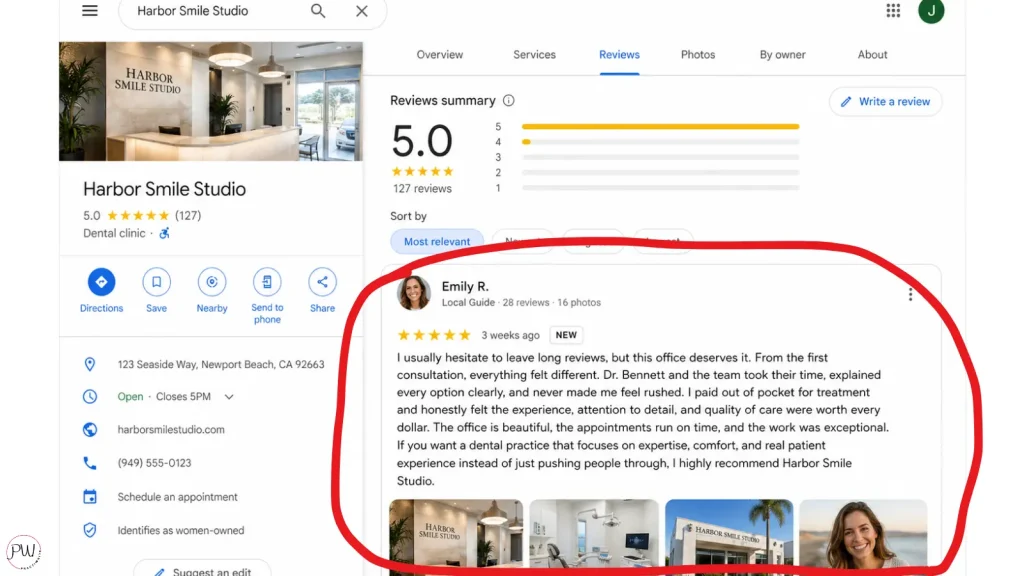
Reviews with photos rank higher and convert better. A small training tip: when a patient is excited about a result (cosmetic case finish, implant delivery, a long-anticipated treatment), ask if they’d be comfortable adding a quick photo to their Google review. About half will say yes.
What’s The Best Online Booking Integration For Fee-For-Service Dental Practices?
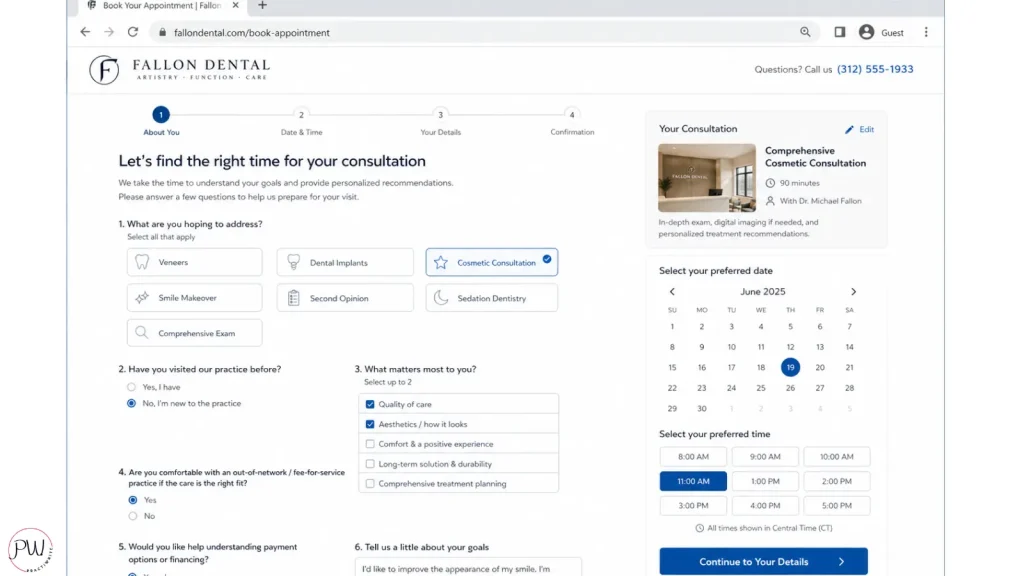
The best online booking integration for fee-for-service dental practices is one:
- That connects directly to your practice management system
- Lets you control which appointment types are bookable online
- And keeps the patient inside your brand experience instead of routing them through a third-party marketplace
NexHealth, LocalMed, and Weave are the strongest options for FFS practices in 2026. Zocdoc is not, and that’s important.
Why does this matter? Online booking integrations affect both conversion and the kind of patient who books.
A booking platform that treats every dental visit the same will pull insurance shoppers as easily as comprehensive cases. A booking platform configured by an FFS-aware team will pull qualified, committed new patients.
Why I don’t recommend Zocdoc for FFS practices
Zocdoc is a patient marketplace built around insurance filtering. Patients search Zocdoc by their dental plan, see practices that “accept” their insurance, and book the cheapest available appointment. The entire UX is designed around insurance coverage as the primary decision criterion.
For a PPO-heavy practice that needs volume, Zocdoc can work. For an FFS practice trying to attract patients who are not buying on insurance, Zocdoc actively works against your positioning.
I’ve watched FFS practices spend money on Zocdoc and complain that all they get is one-and-done insurance shoppers. That’s not a Zocdoc problem. It’s a fit problem.
Zocdoc is doing exactly what it’s designed to do.
What to use instead
- NexHealth. Modern, integrates with most major dental PMSs, gives you full control over appointment types and pre-screening questions. My current top pick for FFS practices.
- LocalMed. Real-time scheduling with strong PMS integration. Reliable.
- Weave. Includes scheduling alongside texting, payments, and review tools. Good for practices that want consolidated software.
- Solutionreach. Older but functional. I’d consider it second-tier in 2026.
Booking best practices for FFS
- Don’t make every appointment type bookable online. Hygiene visits, single-tooth consults, and emergencies can usually go online. Comprehensive new patient exams, implant consults, and full-mouth rehab consults should funnel through the front desk first so they can pre-qualify and set the right expectation.
- Use intake questions that pre-qualify. A simple “What brings you in?” combined with “Are you currently a patient anywhere else?” filters more than you’d think.
- Sync with your actual calendar. If you don’t want bookings four months out, set the limit. If you don’t want availability tomorrow, set that too.
The goal isn’t more bookings. It’s more qualified bookings.
How Should Fee-For-Service Dental Practices Use Google Posts?
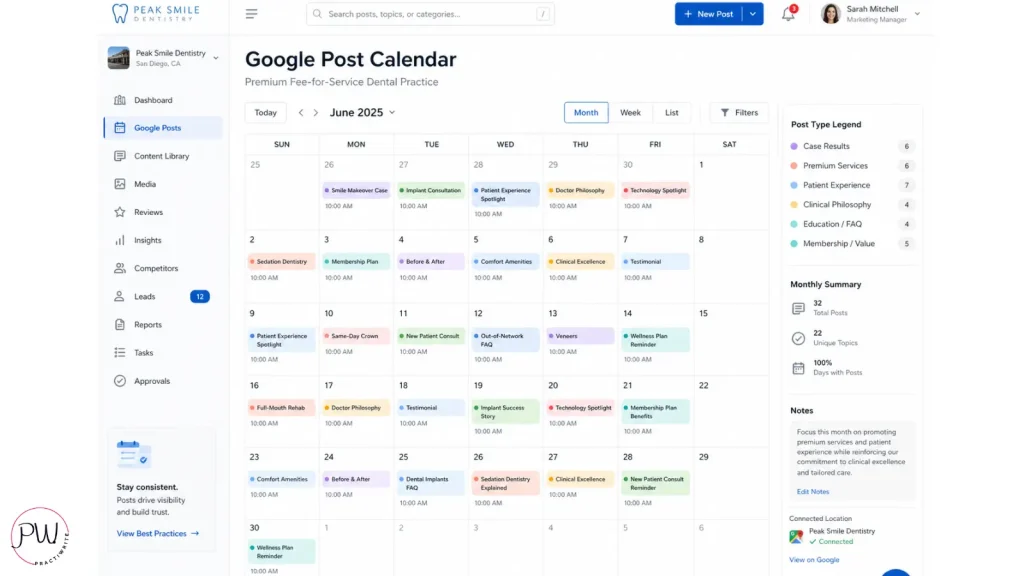
Fee-for-service dental practices should use Google Posts to reinforce positioning, showcase clinical expertise, and feed Google’s algorithm fresh content that signals an active, high-trust profile. The post types that work hardest for FFS practices are:
- Membership plan announcements
- Signature procedure case studies
- Technology investments
- Team credentials
- And educational content that addresses the “why we don’t take insurance” question without being defensive.
In 2026, Google Posts also act as a direct signal for Google’s AI Overviews. Practices with recent, keyword-relevant posts are more likely to be cited in AI-generated answers for relevant local searches.
Aim for at least one post per week, two if you can sustain it.
Post types that hit hardest for FFS
1. Signature procedure case study (anonymized). Lead with the outcome. “We just delivered a final All-on-Four case that started 14 weeks ago.” Add a before/after photo with patient consent. Close with what kind of case fits this kind of plan.
2. Membership plan callout. “Our in-house dental membership plan covers two cleanings, two exams, all routine X-rays, and 20% off treatment for $X/month. No insurance, no claim forms, no surprises.” This is the post insurance shoppers click and self-disqualify on, which is what you want.
3. Technology or training update. “Dr. [Last Name] just completed a [number]-hour course on [topic] at [institute].” Patients paying premium fees want to know you’re investing in expertise.
4. Educational “why” post. “Why our practice doesn’t participate in PPO networks: a short explanation.” Three to four sentences. Calm, confident, no defensiveness. This single post type has been one of the highest-converting we’ve seen for FFS practices that publish it.
5. Team or doctor credential. “[Doctor name] is one of [number] dentists in [state] who hold [certification/fellowship].” Cite the source.
6. Five-star review repost. With patient permission, screenshot a strong review and post it as a Google Post. Keeps the social proof loop going.
What to avoid
Generic dental holidays (“Happy National Tooth Day!”). Stock photo posts. Anything that reads like a PPO clinic (“New patient special: $99 cleaning, X-rays, and exam!”).
The discount-coded language is a signal Google associates with volume practices, and it dilutes everything else you’re doing.
How Do Fee-For-Service Dental Practices Use Google’s Ask Maps (The Q&A Replacement)?
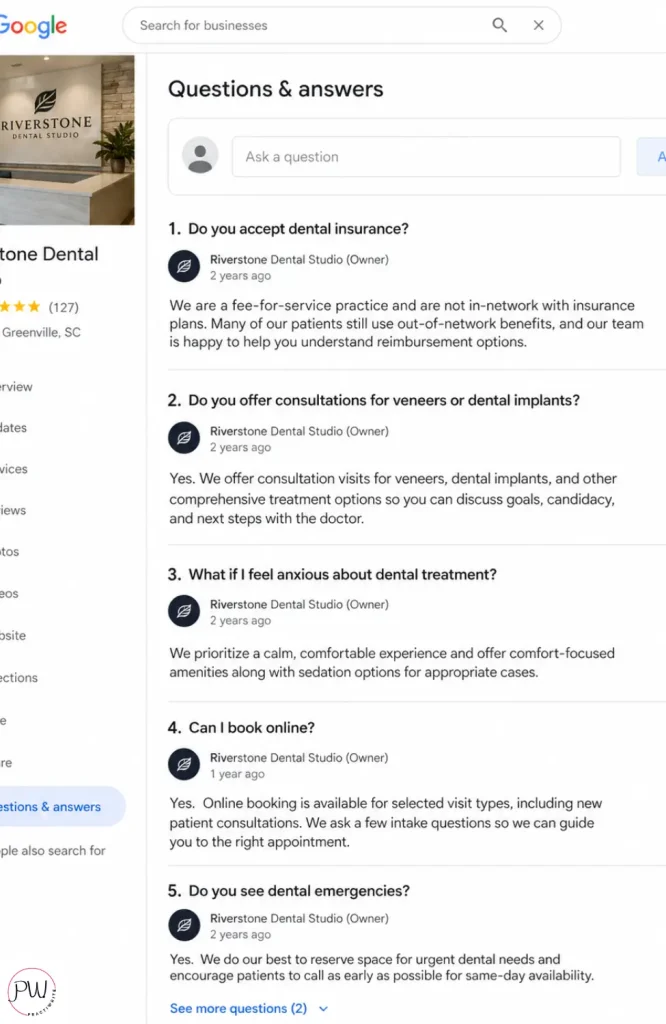
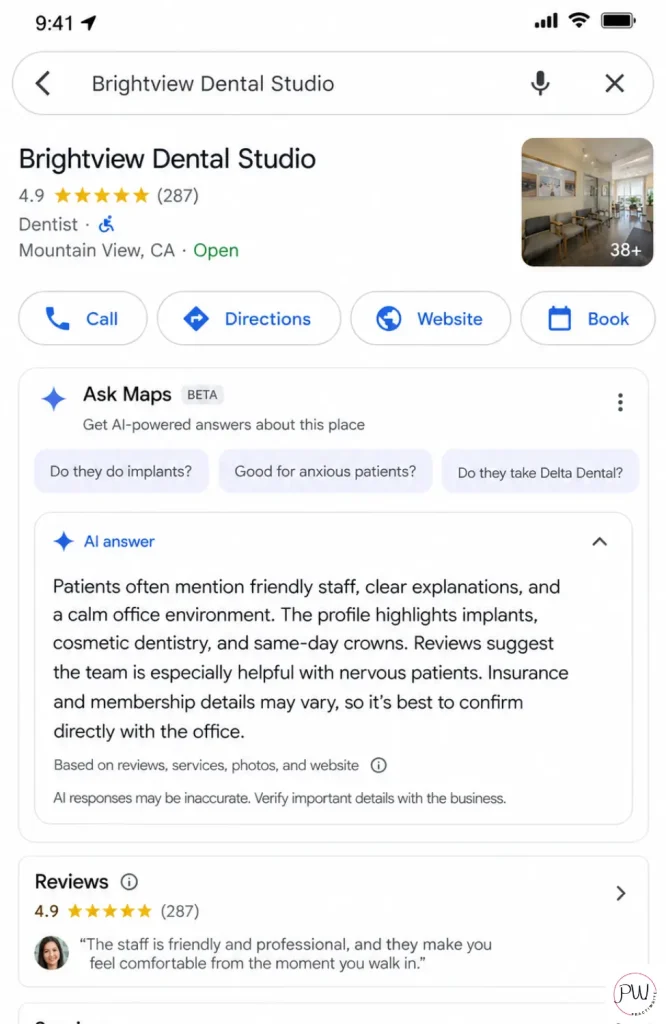
Google’s Ask Maps is the AI-powered feature that replaced the Google Business Profile Q&A section in late 2025. Powered by Gemini, it generates real-time answers to patient questions by pulling from your GBP fields, your website content, your reviews and review responses, your photo captions, and third-party citations across the web. For fee-for-service dental practices, Ask Maps is the most consequential GBP change in a decade because it killed the old seven-questions-and-answers strategy and replaced it with an AI that decides what your practice “is” based on every public signal it can find.
Here’s what actually happened. Google officially discontinued the Q&A API on November 3, 2025, and the public Q&A section started disappearing from profiles on December 3, 2025. The rollout has been gradual, so some practices may still see legacy Q&A content for now. Don’t bother seeding it. Don’t strategize around it. It’s gone.
The replacement, called “Ask Maps” or “Ask about this place,” sits in the Maps interface where the Q&A section used to live. A patient types a question. Gemini answers in seconds, in conversational language, pulling from sources you don’t directly edit.
And patients are using it. According to BrightLocal’s Local Consumer Review Survey 2026, the share of consumers using AI tools for local business recommendations jumped from 6% in 2025 to 45% in 2026. In one year. AI search isn’t a future trend. It’s happening on your profile right now.
You’ve lost the ability to seed seven questions in your own voice. But you’ve gained influence over every Ask Maps answer Gemini will ever generate about your practice, if you know what feeds it.
What Ask Maps actually pulls from
Ask Maps doesn’t have a single field to optimize. It synthesizes. Gemini pulls from:
- Your GBP description, services, attributes, and Products
- Your website content, especially FAQ pages with FAQ schema markup
- Your Google reviews and your responses to them
- Your photo captions and metadata
- Third-party citations, directories, and dental review sites
If your signals are consistent across all of those, the AI tells patients exactly what you’d want them to hear. If your signals are sparse or conflicting, Gemini fills in the gaps with assumptions. That’s how a fee-for-service profile ends up with the AI confidently telling patients you “accept most insurance plans.”
Why this shift is good news for fee-for-service practices
Hear me out. The old Q&A required logging into a personal Google account, seeding seven questions, switching accounts, and answering them. Most dentists never did it. The ones who did got a real but narrow advantage.
Ask Maps rewards a different game entirely. It rewards consistency across every signal you control. Which means the FFS practice with a sharp website FAQ, a precisely written GBP description, FFS-flavored review responses, and aligned third-party listings can shape what Gemini says about it across thousands of patient queries, in real time, without touching a single Q&A widget.
Most generic dental marketing agencies are still telling their clients to seed Q&A questions in 2026. They haven’t caught up to what Google killed five months ago. That’s your opening.
The new FFS Ask Maps optimization plan
Here’s the seven-part feed strategy I’d run for any fee-for-service dental practice right now.
1. Build an FFS-positioned FAQ page on your website with FAQ schema markup.
This is the highest-impact move. Create a dedicated FAQ page (or section) that answers the questions FFS patients actually ask, in 2 to 4 clear sentences each. Wrap it in FAQPage schema so Gemini can parse it confidently. These are the same seven questions you would’ve seeded in Q&A, now living where they should’ve been all along:
- Are you in-network with my dental insurance?
- Do you offer a membership plan for patients without insurance?
- Why is your fee higher than the dentist down the street?
- How long is a new patient appointment?
- Do you accept HSA, FSA, or financing?
- Do you do same-day emergency visits?
- Are you accepting new patients?
Write each answer with FFS positioning baked into the language. The same content strategy as before. New address.
2. Make your GBP description and services do double duty.
Every Ask Maps answer Gemini generates about your practice will pull partly from your GBP fields. If your description says “comprehensive single-clinician dentistry” and your services list leads with implants, full-mouth rehab, and IV sedation, the AI tells patients exactly that. If your description says “family dentistry for the whole crew,” the AI tells patients you’re a volume practice. You’re literally writing Gemini’s script.
3. Engineer your review responses for AI consumption.
Reviews are now a primary Gemini input. Every response you write feeds the AI’s understanding of your practice.
Instead of “Thanks for the kind words!” write “Thanks, [Name]. Glad we could finish your implant case before the wedding. The longer appointments we plan for comprehensive cases really do make the difference.” That single response taught Gemini three things: you do implants, you plan longer appointments, and you handle comprehensive cases.
4. Caption your photos with FFS-coded language.
Photo captions get crawled. A photo captioned “Our CBCT imaging suite for implant treatment planning” gives the AI a clean positioning signal. A photo captioned “front desk” gives it nothing. Caption every upload with intentional, descriptive, FFS-aligned language.
5. Audit your third-party citations.
Healthgrades, Yelp, Facebook, and dental directory sites all feed Gemini. If those listings still say “accepts most insurance” because someone set them up six years ago, that’s what the AI will tell patients, even if your GBP says otherwise. Audit every public listing. Align the language. Consistency across sources is what Gemini trusts most.
6. Migrate any valuable Q&A content before it’s gone for good.
If you previously seeded Q&A questions and answers, screenshot them now and move that copy to your website FAQ page or business description. Once Google fully sunsets the section, that content disappears with no archive.
7. Test Ask Maps yourself, weekly.
Open Google Maps. Search your practice. Tap “Ask about this place” and run the seven questions above. See what Gemini actually tells patients.
If the answer is wrong or generic, the fix is to strengthen the signal in whichever source the AI pulled from. This is the new monitoring routine. Almost nobody is doing it. Which means the practices that do it own the answer Gemini gives.
Which Google Business Profile Attributes Matter Most For Fee-For-Service Practices?
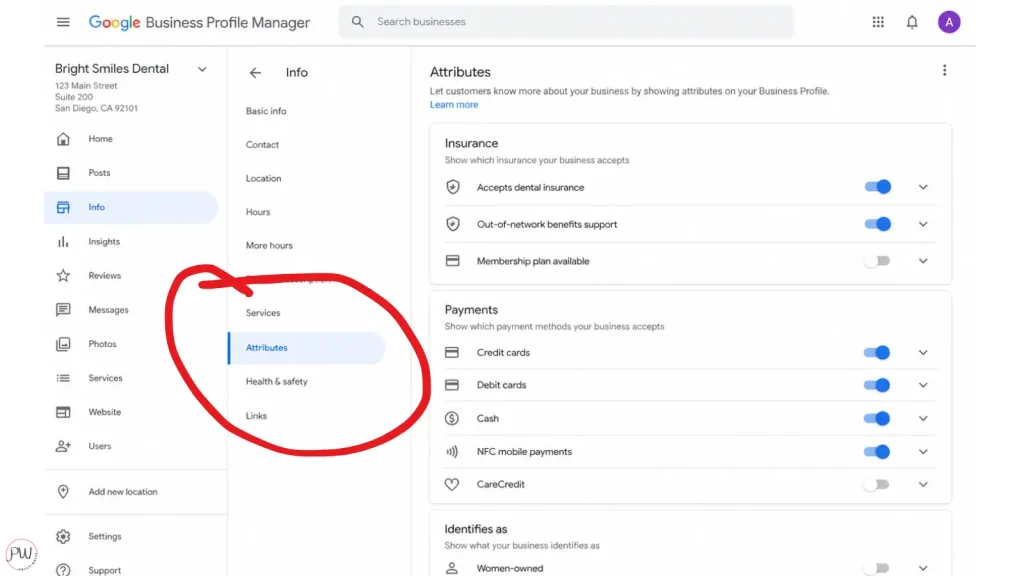
Google Business Profile attributes are the structured tags that tell Google specific facts about your business: what payment methods you accept, what insurance you take, what accessibility features you offer, what identifies the business (woman-owned, sensory-impaired friendly, veteran-owned), and what amenities are available. For fee-for-service practices, the Insurance and Payment attributes are the highest-stakes fields because they’re often where in-network filters either include or exclude your practice from a search result.
This is the section every other dental GBP guide skips. It’s also the section most FFS practices have set up wrong, usually because someone in the front office clicked “Yes, accepts insurance” five years ago without thinking about it.
The Insurance attribute
When you toggle “Accepts insurance” to “Yes” on your GBP, you can become eligible for Google’s “in-network” filter on certain searches. For FFS practices, that’s a problem. You’re not in-network. You’re filing as a courtesy.
My recommendation:
- If you’re truly cash-pay only, set “Accepts insurance” to “No.” This screens out shoppers automatically.
- If you file insurance as a courtesy for PPO patients, leave the toggle on but be specific in your description and Q&A about your out-of-network status. Don’t list specific PPO networks even if Google asks.
- If you accept Medicaid, that’s a different positioning conversation entirely and outside the FFS scope.
The Payment Methods attribute
This one’s pure upside for FFS. Add every payment method you accept:
- Credit cards (Visa, Mastercard, Amex, Discover)
- HSA/FSA
- CareCredit or financing partners
- Cash and check
- In-house payment plans (if applicable)
A profile that lists HSA, FSA, and financing alongside major cards signals “we make paying for premium dentistry easy.” A profile that only lists “credit card” looks underdone.
Accessibility attributes
Wheelchair-accessible entrance, parking, and restroom. Add what you have. Don’t claim what you don’t.
Identifies-as attributes
Woman-owned, sensory-impaired friendly, veteran-owned. If they apply to your practice, add them. They don’t change your ranking dramatically, but they do help patients self-select practices they connect with.
What Should Fee-For-Service Dental Practices NOT Do On Their Google Business Profile?
Fee-for-service dental practices should avoid five specific moves on your Google Business Profile that systematically attract the wrong patient:
- Listing every PPO network they accept
- Using stock smile photos
- Accepting Google’s AI-generated description
- Not letting third-party listings contradict your GBP
- And posting discount-coded “new patient specials”
Each of these signals to both Google and prospective patients that the practice competes on coverage and price, which is the opposite of FFS positioning.
This is the contrarian section. Most GBP guides for dentists tell you to do exactly what I’m telling you not to do. Here’s why each one matters.
1. Don’t list every PPO you accept
Some FFS-leaning practices file as a courtesy for a handful of plans. Listing those plans publicly on your profile turns your GBP into a comparison shopper’s favorite tool. Patients search for “dentist that takes [plan name]” and book based on that single criterion, then arrive surprised when they’re paying out-of-pocket.
Keep insurance conversations off the public-facing profile and inside the new patient call.
2. Don’t use stock smile photos
Patients can spot stock photography in a heartbeat, especially the ones with the suspiciously perfect lighting and the model pretending to floss. Stock signals that you didn’t bother. For an FFS practice, that’s the opposite of the message you’re sending.
3. Don’t accept Google’s AI-generated description
Google’s GBP dashboard now suggests AI-generated descriptions to fill the “About” field. They’re trained on generic dental practice copy and they will erase your positioning in one click. Reject the suggestion. Write your own. Or rewrite the AI’s draft until it sounds like your practice.
4. Don’t let outdated third-party listings contradict your GBP
In the Ask Maps era, Gemini doesn’t just read your Google Business Profile. It cross-references every public listing it can find about your practice (Healthgrades, Yelp, Facebook, Apple Maps, Bing Places, Vitals, the local Chamber site, that dental directory you joined in 2018) to validate what your GBP says.
If a Healthgrades listing still says “accepts most major insurance” from when the practice was PPO five years ago, that contradiction quietly undoes every fee-for-service signal in your GBP. The AI hedges, splits the difference, and tells the patient something neither of you said.
Audit every third-party listing your practice appears on and align the language with your current FFS positioning. Most practices have 15 to 40 of these. They’re the silent leak in your AI search visibility.
The old playbook said to seed questions like “Do you accept Delta Dental?” so you could answer them publicly. For an FFS practice, that’s a positioning disaster. You’re spending your most visible asset on insurance content. Seed FFS questions instead (see the Q&A section above).
5. Don’t post discount-coded “new patient specials”
“New patient special: $79 cleaning, X-rays, and exam!” is the universal PPO clinic flag. Posting that on your Google Posts or in your description trains both Google and prospects that you compete on price. If you want to make new patient access easier, lead with your membership plan instead.
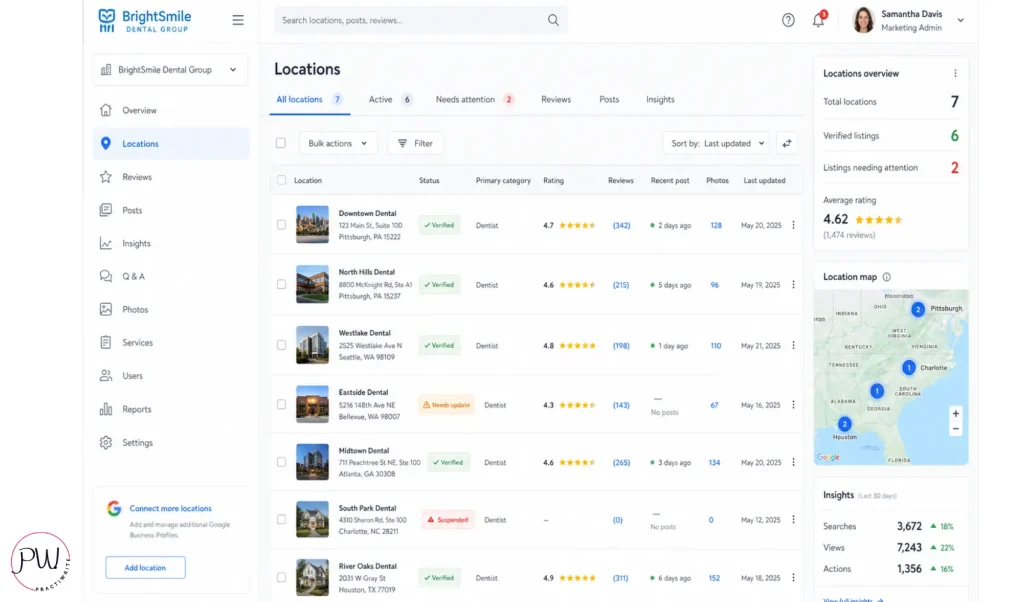
How Should Multi-Location Fee-For-Service Practices Manage Google Business Profile?
Multi-location fee-for-service practices need a separate Google Business Profile for each physical location, each customized with location-specific NAP, services, photos, reviews, and a unique landing page on the practice website. Trying to consolidate multiple locations under one GBP violates Google’s guidelines and tanks visibility for every office.
The harder part for FFS groups is keeping brand voice and FFS positioning consistent across locations that may be at different stages of PPO transition.
The multi-location rules
- Every location gets its own GBP. No exceptions, no shortcuts.
- Each profile gets its own local phone number. Don’t use a centralized call center number on individual profiles. Google reads it as inconsistency.
- Each profile links to a location-specific landing page on your website (not the homepage). The landing page should match the location’s positioning, services, and team.
- Each profile builds its own reviews. Don’t try to funnel reviews to one main location. Generate location-specific review links and use them.
- Each profile gets its own photos and team headshots. A real, distinct location with real, distinct people. Don’t reuse photos across locations.
The FFS-specific multi-location challenge
If you’re running a multi-location FFS group where some locations are fully fee-for-service and others are still transitioning out of PPOs, your Google Business Profiles need to reflect each location’s actual current positioning, not your aspirational positioning. A location that still files seven PPO plans should not have a fully FFS-positioned description. Patients show up confused, the team gets caught in awkward conversations, and reviews suffer.
I’d recommend treating each location’s GBP as its own positioning project. Audit where each office actually is. Match the profile to that reality. Update as the positioning shifts.
Tools for managing scale
For three or more locations, manual management gets brittle fast. Tools that help:
- Yext
- Uberall
- LocalClarity (especially strong for multi-location Q&A and review management)
- Whitespark Local Citation Finder for cross-location citation audits
Add UTM parameters to the website link on each GBP so you can track traffic and conversions back to specific listings in Google Analytics. Most multi-location practices skip this step. The ones who don’t get a clearer picture of which locations are actually pulling new patients from search.
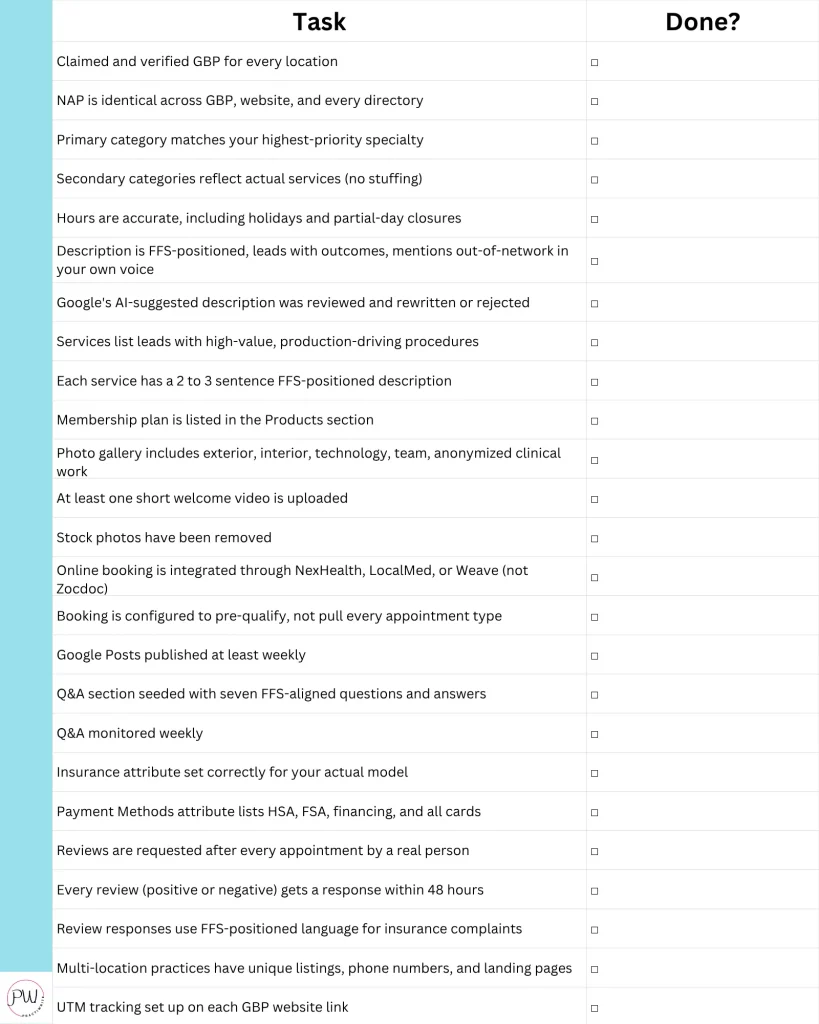
The Fee-For-Service GBP Optimization Checklist
Print this. Pin it to the wall behind your front desk. Walk through every line.
Wrapping Up: The Bottom Line
A fee-for-service practice can’t afford to run its Google Business Profile like a PPO clinic. Every field on your profile, from category to description to Q&A to attributes, is either reinforcing your positioning or undermining it. There’s no neutral.
The practices winning in 2026 aren’t the ones with the most polished profiles. They’re the ones with profiles that filter ruthlessly for the patient they actually want.
Set up your GBP to attract patients who value time, expertise, and complete care. Screen out the ones shopping on coverage. Reject the AI-generated description.
Cut the Zocdoc booking link. Reseed your Q&A with the questions FFS prospects actually ask. List your membership plan in the Products section.
Reject Google’s PPO-coded defaults wherever you find them.
Do that, and your phone starts ringing differently. Fewer calls. Higher quality. More cases that match what you actually want to be doing.
The dentists I’ve watched win this game weren’t the ones with the prettiest websites or the biggest ad budgets. They were the ones who understood that their Google Business Profile was a positioning asset, not a directory listing, and treated every field accordingly.
Now you’ve got the blueprint. The question is whether your profile is doing this work for you, or whether it’s quietly working against you.
Let Practiwrite Handle Your GBP Profile Management
If this all sounds overwhelming for you, no worries. See if your practice is the right fit for Practiwrite by getting your Dental Practice Roadmap.
Your Dental Practice Roadmap is a GBP and website audit that shows you exactly where you stand, what keywords you’re ranking for now, what you should be ranking for, and a step-by-step plan to close those gaps.
No vague recommendations. No fluff. Just a clear picture of what’s broken and what to do about it.
Book your Dental Practice Roadmap and get yours free.

10+ year content strategist, writer, author, and SEO consultant. I work exclusively with fee-for-service dental practices that want to build value, not volume.